Best AI Video Editors for Repurposing Long Videos into Shorts in 2026
The Verdict
Vizard
8.1 / 10
Pros
- Editing burden — lowest of the four; picks and filler removal are defined before the run, so effort sits in setup, not cleanup.
- Speed and scale — under two minutes per video.
- Cost — $0.24 per 10-min video.
Cons
- Editorial control — steerable before the run, not after.
- Clip selection quality — solid, not exceptional.
- Editing burden — aspect ratio cannot be adjusted.
Descript
8.0 / 10
Pros
- Editorial control — highest of the four; selection is prompt-driven and output opens in a real editor.
- Editing burden — aspect ratio maintained, captions automatic.
- Cost — $0.13 per 10-min video, the lowest here.
Cons
- Speed and scale — meaningfully slower than the other three; does not scale to a backlog.
- Ease of export — an extra editor step before anything ships.
Submagic
7.7 / 10
Pros
- Clip selection quality — the best of the four.
- Editing burden — the only tool that returned properly framed vertical output; no bars, no letterboxing.
- Speed and scale — fast, clean export.
Cons
- Editorial control — lowest here; you take what you are given.
- Cost — ~$0.53 per 10-min video, and clipping sits behind the Magic Clips add-on with per-video length caps.
Opusclip
6.7 / 10
Pros
- Clip selection quality — reliably finds complete, self-contained thoughts.
- Ease of export — frictionless.
- Speed and scale — roughly two minutes per video.
Cons
- Editing burden — weakest framing in the group; clips not well centred.
- Editorial control — limited; accept the picks or redo them.
- Cost — $0.48 per 10-min video on Pro; Starter costs twice that
How the Four Scored by Criteria’s
Opusclip | Vizard | Submagic | Descript | |
|---|---|---|---|---|
Clip selection quality weight : 25% | 9 | 7 | 10 | 8 |
Editing burden weight : 25% | 5 | 9 | 9 | 8 |
Editorial control weight : 25% | 4 | 7 | 3 | 10 |
Ease of export weight : 10% | 9 | 9 | 9 | 7 |
Speed and scale weight : 10% | 8 | 9 | 9 | 4 |
Cost weight : 10% | 7 | 9 | 5 | 9 |
Weighted Total | 6.7 | 8.1 | 7.7 | 8.0 |
The Curious Case of YouTube Shorts
Shorts can also cost you long-form views. An arXiv study of 250 channels above 100,000 subscribers found long-form views fell by an average of 743,589 after a creator started posting Shorts (Rajendran, Creusy & Garnes, February 2024). The mechanism is simple enough: viewers got the point from the clip and never clicked through. That is a funnel problem, not a Shorts problem — it happens when a clip resolves completely and leaves nobody a reason to continue.
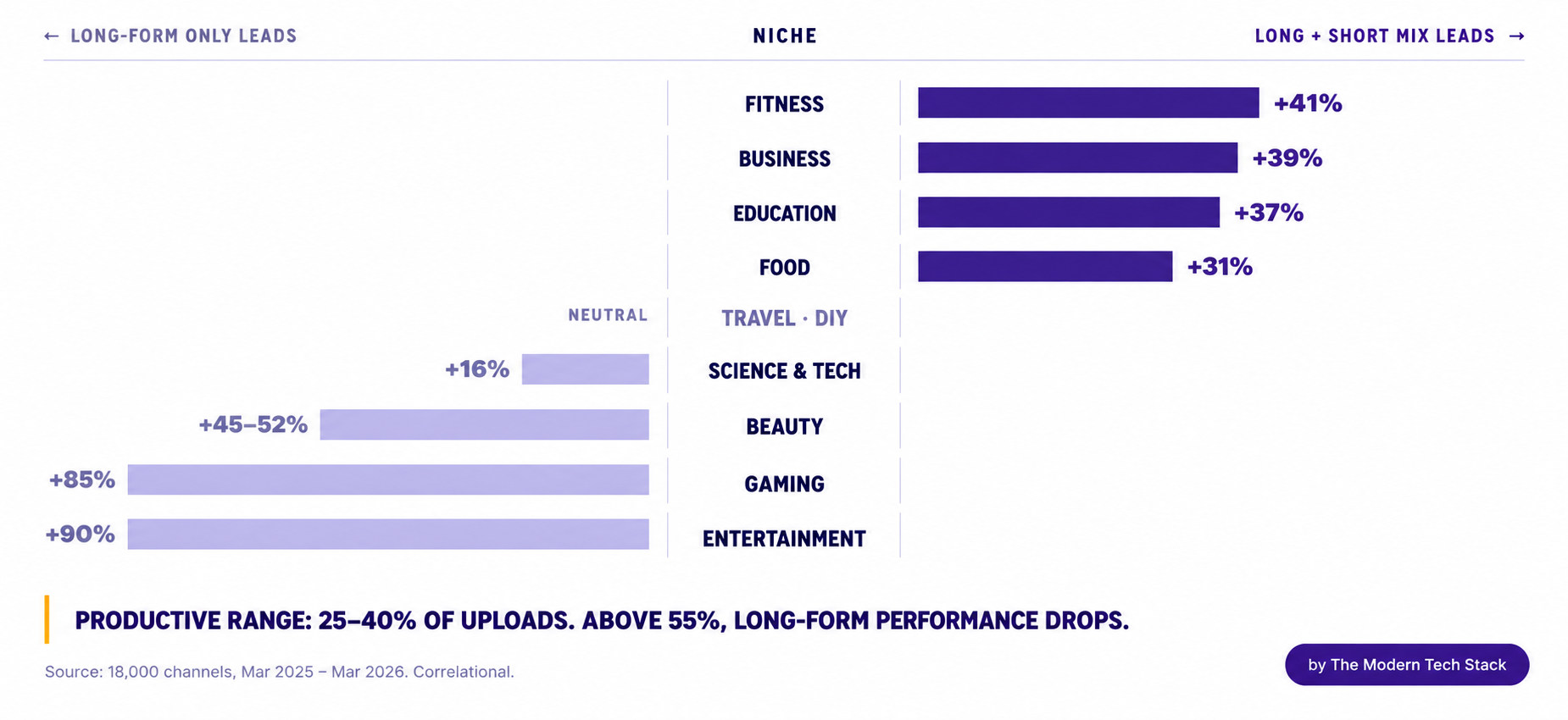
Planned the other way round, the same format becomes an acquisition channel. If a Short is built as a funnel step — designed to intrigue someone into the long-form video rather than to satisfy them on the spot — it is one of the fastest ways to grow an audience that YouTube currently offers. How well that transfer works also depends on what business you are in. Across 18,000 channels tracked for a year, those mixing Shorts with long-form held 41% more subscribers in fitness, 39% in business, 37% in education and 31% in food. In gaming, entertainment and beauty the shift did not happen at all, and long-form-only channels led. The productive range sits at 25–40% of uploads.
The takeaway is not whether to post Shorts. It is to treat every Short as an acquisition step for the long-form video — and to check first whether your category is one where that transfer actually occurs.
Who Actually Gains Subscribers From Shorts
What Repurposing Actually Involves
Repurposing a long-form video properly means finding the moments where the audience was actually paying attention, shaping each into a story small enough to land in thirty seconds, and then rebuilding it for a vertical frame that assumes no sound and no patience. In practice that is an eight-step loop:
Analyse the long-form video
Open impressions, engagement and the retention for the long-form video on youtube analytics.
Find three to eight clip-worthy moments
The points where retention flattens, rises, or falls off a cliff. Those inflections are the audience telling you where the interesting part was, and they are more reliable than your own memory of the recording.
Build around intriguing micro-ideas
Structure the short form into – Problem, insight, payoff. The payoff should ideally be delivered fully in the long-form video
Re-edit rather than crop
Reframe deliberately, centre the speaker, burn in captions. A letterboxed 16:9 clip dropped into a 9:16 frame reads as lazy in the feed and gets scrolled past.
Obsess over the ‘hook’ i.e first 3 seconds
A youtube short lives and dies by its hook within the first 48 hours. If people are not getting past the first 3 seconds, the impressions stall almost immediately
Promise a Payoff
Link the full video and promise a compelling payoff
Measure the funnel and not vanity
Watch time, retention, subscribers gained, and views on the source long-form. Not Shorts impressions in isolation.
Keep testing the hooks
The same clip with three different openings is the any easy and no-cost experiment worth executing.
Selected Tools and Evaluation Methodology
How the shortlist was built
What was measured, and why
Criteria | Why this criteria | Weight |
|---|---|---|
Clip selection quality | Does it find a complete thought with a hook, or a random thirty seconds? | 25% |
Editing burden | How much cleanup do you do after the AI finishes? | 25% |
Editorial control | How easily can you edit what has been produced? | 20% |
Ease of export | How easy is it to get the export in required format and of quality? | 10% |
Speed and scale | Time per video, and what happens when you feed it a hundred? | 10% |
Cost | Per finished video clipped — not per credit. | 10% |
How Each Tool Fared
OpusClip
Best for : Clip selection, Weakest on : Editorial control & editing burdenThe selection was the most concise of the four — it reliably found complete, self-contained thoughts rather than arbitrary windows, which moves the starting point forward significantly. The output frame was the weakest in the group: clips were not well centred, and the aspect-ratio handling left visible compromises. A headline-removal option helps. Processing took roughly two minutes and export was frictionless. I could not properly stress the in-app editor.Vizard
Best for : Low editing burden, Weakest on : Frame controlSelection quality was solid rather than exceptional. What differentiates Vizard is that you can predefine the kinds of moments you want before it runs, so you have a real say in what comes back. That matters most if you already have engagement data: YouTube Analytics gives you the retention curve for the source video, so you can see which points held attention and point the tool at those rather than hoping it guesses right. Filler removal is configurable the same way. Editing is transcript-based, which cuts editing time considerably, though the aspect ratio cannot be adjusted. Under two minutes to process, easy export.Submagic
Best for : Clip selection & Vertical framing, Weakest on : Editorial controlSubmagic produced the best moment selection I saw, and it was the only tool of the four to deliver genuinely well-framed vertical output — no horizontal bars, no letterboxing, no awkward crop. In a feed, that is the most visible quality difference on this list. Control is limited once the clip exists, so you are largely accepting its judgment. Fast, and easy to export. Note that long-to-short clipping sits behind the Magic Clips add-on rather than the base captioning plans.Descript
Best for : Editorial control, Weakest on : Speed & scaleDescript is the outlier. Selection is prompt-driven, so I could genuinely guide what it picked. Editing burden stayed low in the ways that matter — aspect ratio maintained, captions applied automatically — while editorial control was the highest of the four, because output opens in a real editor with transcript-based editing behind it. The cost is time: it took meaningfully longer than the others. If you are willing to spend real polishing effort on each Short, Descript is excellent. If you want to produce Shorts at scale without detailed work on every one, it is overkill.Comparing Costs
These tools are metered in different units. Some bill credits, some bill minutes of source video, some bill whole videos — so the sticker prices are not comparable to each other, and a cheap-looking plan can be the expensive one. I have converted all of them, on a best-effort basis, into a single number: what it costs to clip one ten-minute source video on annual billing.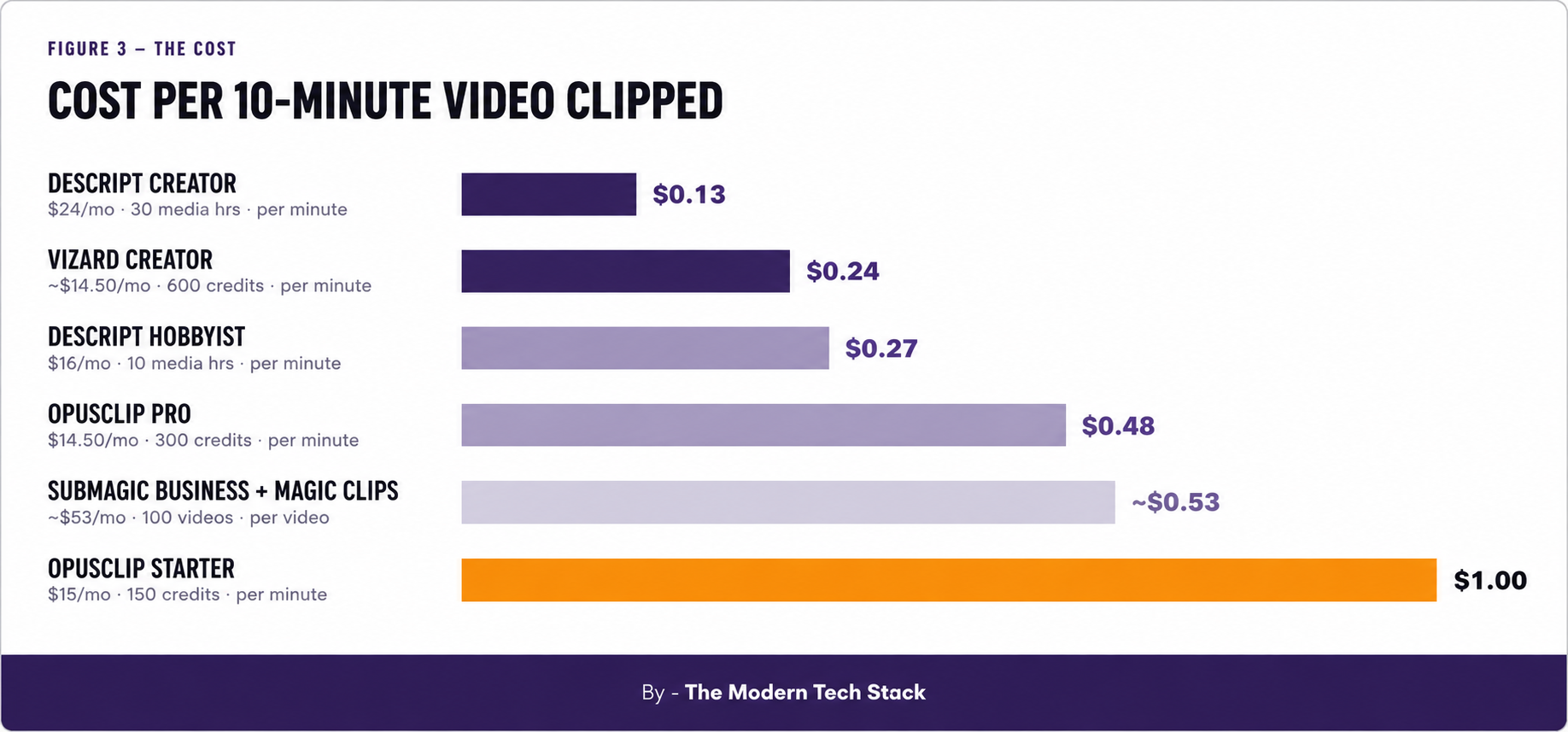
Submagic’s real price is hard to establish. Clipping requires the Magic Clips add-on on top of a base plan, and the base tiers carry per-video length caps — two minutes on Starter, five on Pro, thirty on Business. It was the least legible pricing of the four, and the $0.53 figure assumes you are on the tier that can actually process a full-length source.One caveat on all of this: per-minute billing means the ranking shifts with source length. These figures hold for a ten-minute video. If you publish 45-minute podcasts, rerun the arithmetic on your own footage before committing to an annual plan.
The Decision Criteria: Editing Burden Against Editorial Control
Editing burden is a consequence of using generative engines for creative work, as they may not always produce the desired output. The trade-off is between generation quality and the level of editing control a tool provides, which ultimately determines the best tool for your specific needs.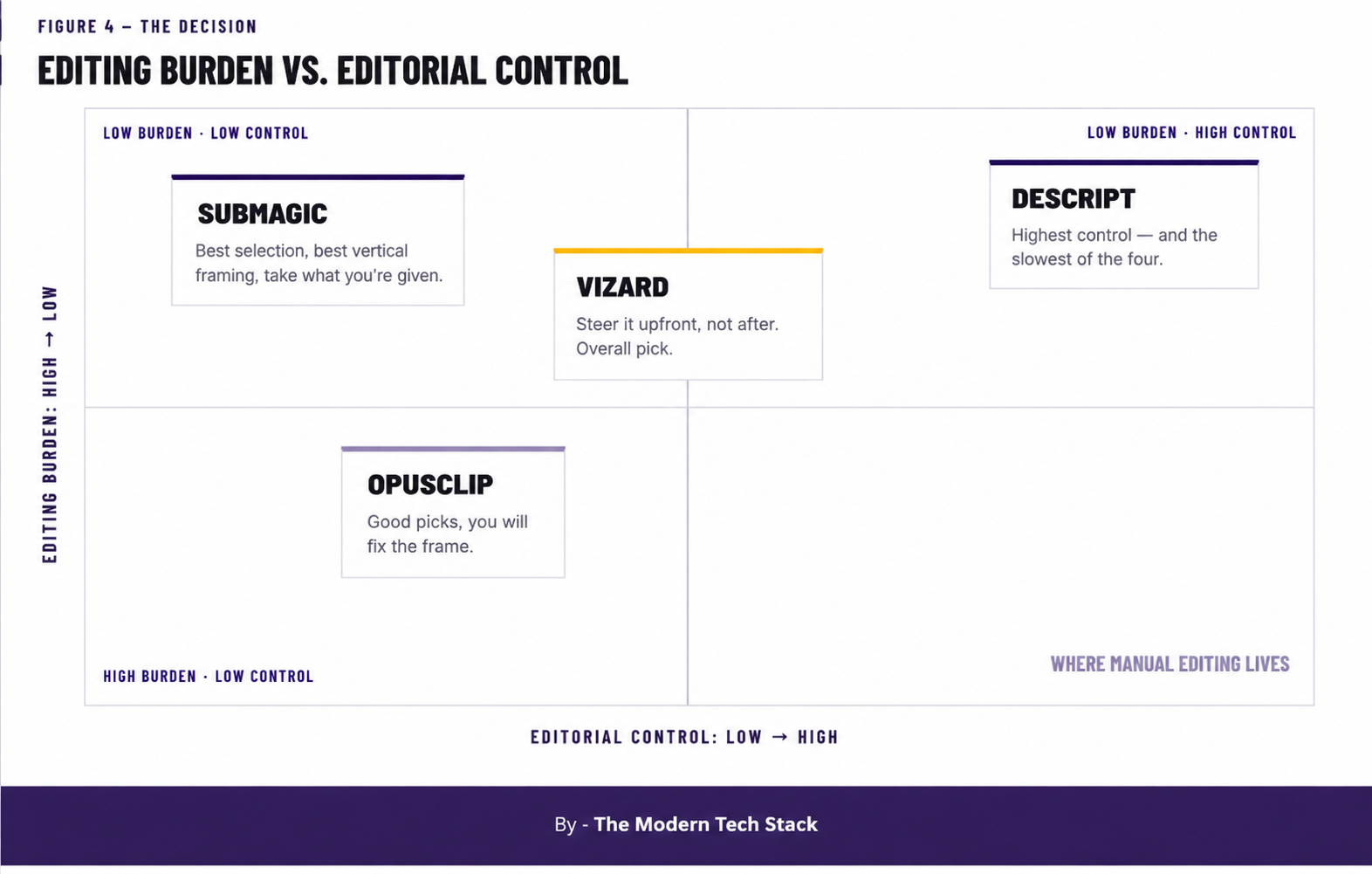
The Verdict in Full
On the rubric as a whole, Vizard takes it at 8.1. It is good at everything and extraordinary at nothing, and it never overreaches — which is exactly what you want from something you intend to keep using. Being able to predefine what it should look for, ideally guided by your own retention data, remains the most underrated feature in this category.For the best-looking output, Submagic. Best selection of the four, and the only one that returned properly framed vertical output. It finishes third on score only because it costs roughly twice per video what Vizard does and gives you almost nothing to adjust afterwards.When you are willing to spend significant polishing effort on each Short, Descript. Highest editorial control by a wide margin, and the lowest cost per minute in the table — but the slowest, and it does not scale to a backlog. It sits 0.1 behind Vizard on a rubric that penalises it for speed; on a per-clip basis it may well be the best tool hereOpusClip remains the reference point the category is measured against, and the selection genuinely is good — but vertical framing is now its weak spot, and Starter is the wrong plan for almost everyone.Pick the one that matches your workflow
Weekly cadence or a backlog, go with Vizard. Feed-ready framing above all, Submagic. Few Shorts, polished properly, Descript.Vizard
Submagic
Descript
Sources
- Rajendran, Creusy & Garnes, Shorts on the Rise: Assessing the Effects of YouTube Shorts on Long-Form Video Content, February 2024 — 250 channels, 100k+ subscribers
- AIR Media Tech, Do YouTube Shorts help your long-form videos grow? Data from 18,000 channels — March 2025 to March 2026, 11 niches, correlational
- Google with Cint and Differentology, YouTube Shorts and short-form video content research — EMEA, fieldwork March–April 2023, Poland figures cited
- Neal Mohan at Cannes Lions, June 2025, YouTube reports 200 billion daily views for Shorts
- Tubefilter, Are YouTube viewers treating long-form videos like Shorts? — Metricool analysis, August 2026
- Tubefilter, Despite YouTube’s investment in Shorts, viewers are gravitating toward long-form video, February 2025