Best AI Video Generators for Ecommerce Ads in 2026
The Verdict
Heygen
8.2 / 10
Pros
- UGC realism — the best here. The blend of avatar, audio sync and environment holds up across different products and different settings, which is where most avatar tools come apart.
- Cost — effective. Fifteen 30-second ads fit inside the $24/mo Creator plan with credits to spare; pay-as-you-go does the same fifteen for $22.50
- Editorial control — solid: timeline editor with genuine scene-level edits
Cons
- Hook and variant generation — Underwhelming. Batch mode is a dedicated, well-built workflow, but it does not autogenerate: every avatar and every script has to be supplied by you. It scales your ideas; it does not produce them.
- Asset blending — strong but not built for it. The product is not the focus of the engine.
Creatify
8 / 10
Pros
- Hook and variant generation — strongest, the highest score any tool earns on any criterion in this comparison. From one prompt it generates multiple hooks and genuinely different stories, not one ad rendered three ways. Nothing else here does this.
- Asset blending — strong, the most natural-looking blend of product and avatar in the category
- Editorial control — solid: timeline editor, brand kit, and scene control at the script level.
Cons
- Cost — expensive at scale. Fifteen 30-second ads need 150 credits; Starter gives you 100, so the workload forces you onto Pro at $99/mo, about $6.60 per finished ad — roughly four times Heygen
- UGC realism — solid for UGC ads, a notch below HeyGen’s.
Arcads
7.1 / 10
Pros
- UGC realism — good under the right conditions and notably good on skincare and similar product types.
- Asset blending — good. Strongest on skincare.
- Editorial control — good: script-level editing, most of the controls exists pre-generation than post. They recently launched a workflow builder which looks promising but early.
Cons
- Hook and variant generation — the weakest in this comparison. Every hook must be defined manually; scale comes from duplicating image-to-video workflows rather than from the tool having an idea
- Cost — Fifteen 30-second ads need 450 seconds of avatar talking, which rules out the $29 Lite tier entirely — it has no avatar talking and caps video at 10 seconds and 480p — and lands you on Starter at $77/mo, about $5.13 per finished ad. That is cheaper than Creatify and roughly three times HeyGen
How they Scored by Criteria’s
Heygen | Creatify | Arcads | |
|---|---|---|---|
UGC realism weight : 25% | 9 | 8 | 8 |
Asset blending weight : 20% | 8 | 8.5 | 8 |
Editorial control weight : 20% | 8 | 8 | 7 |
Hook and variant generation weight : 20% | 7 | 9 | 5 |
Cost weight : 15% | 9 | 6 | 7 |
Weighted Total | 8.2 | 8 | 7.1 |
Why Video Ads Are On the Rise
The spend data is unambiguous
US digital advertising reached $294.6 billion in 2025, up 13.9%, per the IAB/PwC Internet Advertising Revenue Report published 16 April 2026. Within that, one format grew at nearly twice the market rate.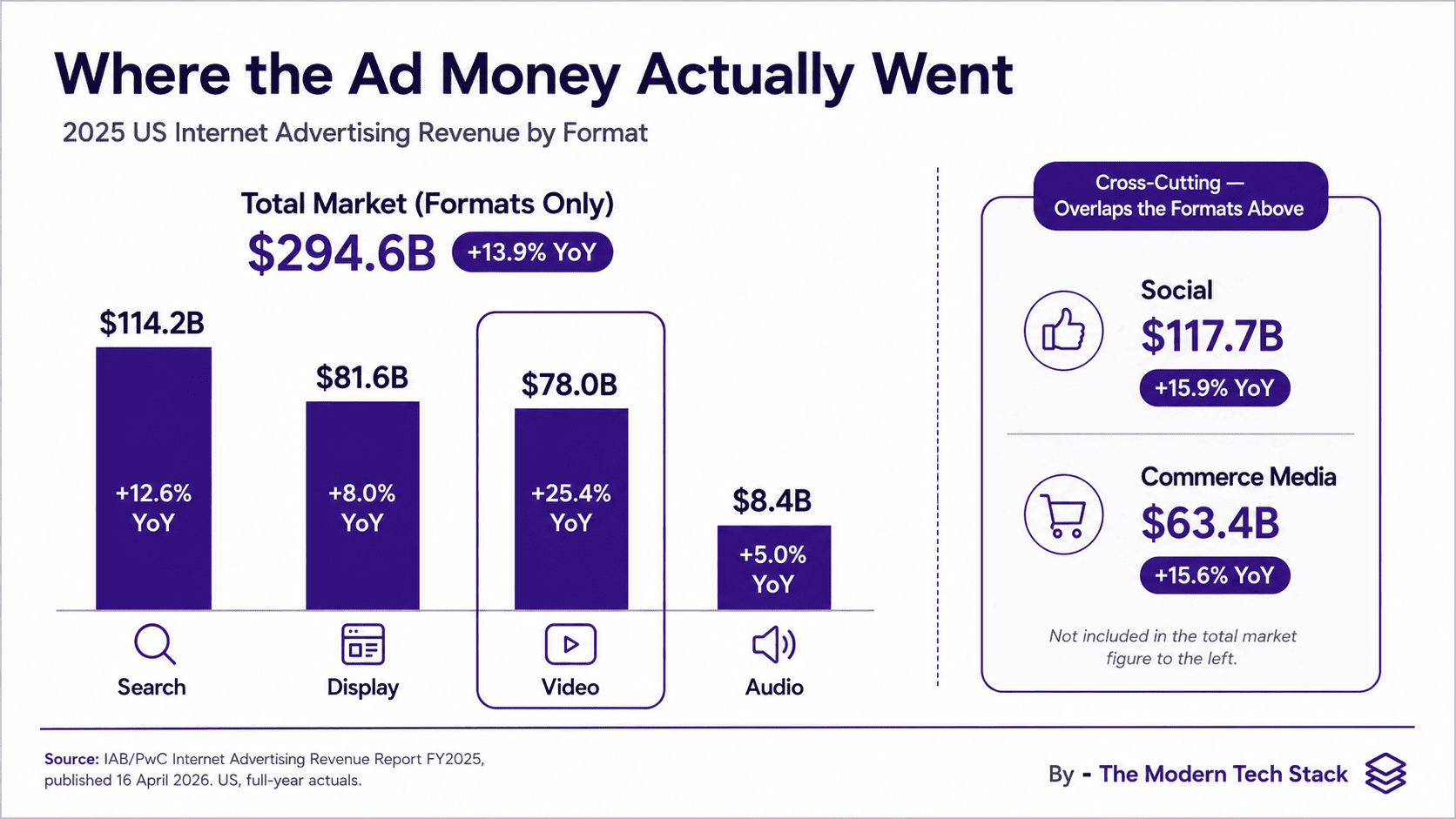
What Making a UGC Ad Actually Involves
Repurposing a long-form video properly means finding the moments where the audience was actually paying attention, shaping each into a story small enough to land in thirty seconds, and then rebuilding it for a vertical frame that assumes no sound and no patience. In practice that is an 7-step loop:
Start from the asset you already own
A product URL, a photo set or a script.
Pick the slot before the tool
A PDP loop and a TikTok hook are different products, and choosing the channel before generation saves editing hours and quality of output.
Write the angles
Not the script — the arguments. Sensitive skin is one ad; makeup-friendly is a different ad with a different opening, a different demo and a different audience. This is the step the category has barely automated.
Earn the first three seconds
The hook is not the best line in the ad; it is the line that retains the user.
Generate, then reject
You’ll generate more assets and filter the ones that are on-point creatively and commercially.
Check product fidelity
User test whether the logo is legible, geometry intact, and whether fine print survived.
Place it and measure it
Run a/b tests and start observing (or rather obsessing) the funnels including ad retention, and conversions.
Selected Tools and Evaluation Methodology
How the shortlist was built
How each tool was assessed
Stream 1 — Self-testing. Creatify as run against the brief on a paid account. This is the only tool in the comparison where the outputs judged are my own, and it is the reason its asset-blending and variant-generation scores are the most confident numbers in the scorecard.Stream 2 — Comparing published outputs. For all three tools I worked through multiple videos published on the vendor’s own website and YouTube channel, looking at the same things each time: how the avatar holds and uses the product, whether lip sync and gesture hold up across a full 30 seconds, whether the audio has intonation or reads flat, and — critically — whether quality is consistent across different products and different environments or only in the one setting the vendor chose to showcase. That last check is what separates HeyGen’s 9 on realism from Creatify’s 8, and it is also why realism scores drawn from this stream are generous by construction: vendors publish their best work.Stream 3 — Reading the editor and batch-processing documentation. Editorial control and variant generation are workflow properties, and workflow claims are settled in help centres rather than in showreels. I read each tool’s editor documentation to establish whether control is script-level or scene-level, and each tool’s batch or bulk documentation to establish whether the batch workflow generates variants or merely renders a list you supply. This is where the sharpest distinction in the whole comparison came from: HeyGen’s batch mode is a dedicated, well-built workflow that requires you to provide every avatar and every script, while Creatify generates multiple hooks and genuinely different stories from a single prompt.
Stream 4 — Normalising cost from official credit documentation. Per-credit pricing in this category is not designed to be comparable, so I fixed one workload — fifteen 30-second ads in a month — and computed it from each vendor’s own published credit rates rather than from pricing-page headline figures. That
What was measured, and why
Criteria | Why this criteria | Weight |
|---|---|---|
UGC realism | Does it read as a real person filming herself, or as an avatar? | 25% |
Asset blending | Does your product sit in the shot convincingly — held, used, correctly rendered? | 20% |
Editorial control | Script-level, scene-level, or take-what-you-get? | 20% |
Hook and variant generation | Does it produce genuinely different arguments, or one ad three times? | 20% |
Cost | What fifteen finished 30-second ads actually cost. | 15% |
Video Inventory tested or reviewed
- Creatify Self Tested Output : https://youtube.com/shorts/fbtryMuSdFY?feature=share
- Heygen UGC Ad Sample 1 (credits : Heygen Youtube Channel) : https://www.youtube.com/watch?v=gGTlvof-9qs
- Heygen UGC Ad Sample 2 (credits : Heygen community forum) : https://app.heygen.com/videos/ugc-ad-video-a00fcbcfd46c4b259b8dadd9d51392c8
- Arcads UGC Ads Sample 2 (credits : Arcads UGC ads page) : https://www.arcads.ai/features/ai-ugc-video
- Arcads UGC Ads, Multiple Samples (credits : Arcads Youtube Channel) : https://www.youtube.com/shorts/hh85sEShbIs, https://www.youtube.com/shorts/SSklz01rAto, https://www.youtube.com/shorts/vIooV6gUixo
How Each Tool Fared
HeyGen
Strongest on: realism and cost. Weakest on: having an idea.The most convincing avatar output in the category, and the margin is visible: the blend of avatar, audio sync and environment holds across different products and different environments, where competitors tend to look right in one setting and wrong in the next. Editorial control is genuine — a timeline editor with scene-level edits, not just script edits. Batch mode is a proper dedicated workflow rather than a bolt-on.But batch mode does not autogenerate. Each avatar and each script has to be provided, which means HeyGen scales your ideas rather than producing any. Pair that with the cost finding — fifteen 30-second ads sit comfortably inside the $24/mo Creator plan — and the shape of the tool is clear: it is the cheapest, cleanest way to render a set of ads you have already written. The gap in its documentation is real, though. No commercial licence terms are published on any official page, which for a brand running these as paid creative is the one thing you cannot leave unanswered.
Creatify
Strongest on: generating genuinely different stories from a single prompt. Weakest on: what that capability costs.Creatify is the only tool in this comparison that does the step I care most about. Give it one prompt and it produces multiple hooks and variants that are genuinely different narratives — not one script re-voiced three times, which is what “variants” means almost everywhere else. That is exactly the workflow argument all three language models make for it, and on this evidence they are right. Asset blending is the best here too: the most natural-looking combination of product and avatar I compared, which matters disproportionately for a texture-driven product like a mineral milk sunscreen. Editorial control is strong — timeline editor, brand kit, scene control at the script level.The cost is the problem, and it is structural rather than incidental. At 5 credits per 15 seconds, a 30-second ad costs 10 credits and fifteen ads cost 150 — which overshoots the 100-credit Starter plan by exactly 50, forcing the workload onto Pro at $99. Credits then expire after two months, so the overage does not bank. You are paying roughly four times HeyGen’s rate for the ability to skip the copywriting.Arcads
Strongest on: skincare ugc ads. Weakest on: telling you anything before you pay.The realism is good, but conditionally — it holds up on certain product types, skincare especially, and is less reliable outside them. Asset blending follows the same pattern and is genuinely good on skincare products, which for a sunscreen brief is the relevant case. Editorial control is script-level: real, but you cannot reach into a scene the way you can in HeyGen or Creatify.How do the costs compare
Every tool here meters differently, and none of them shows you this number. Below is what it takes to produce fifteen 30-second UGC ads in one month, computed from each vendor’s own published credit rates.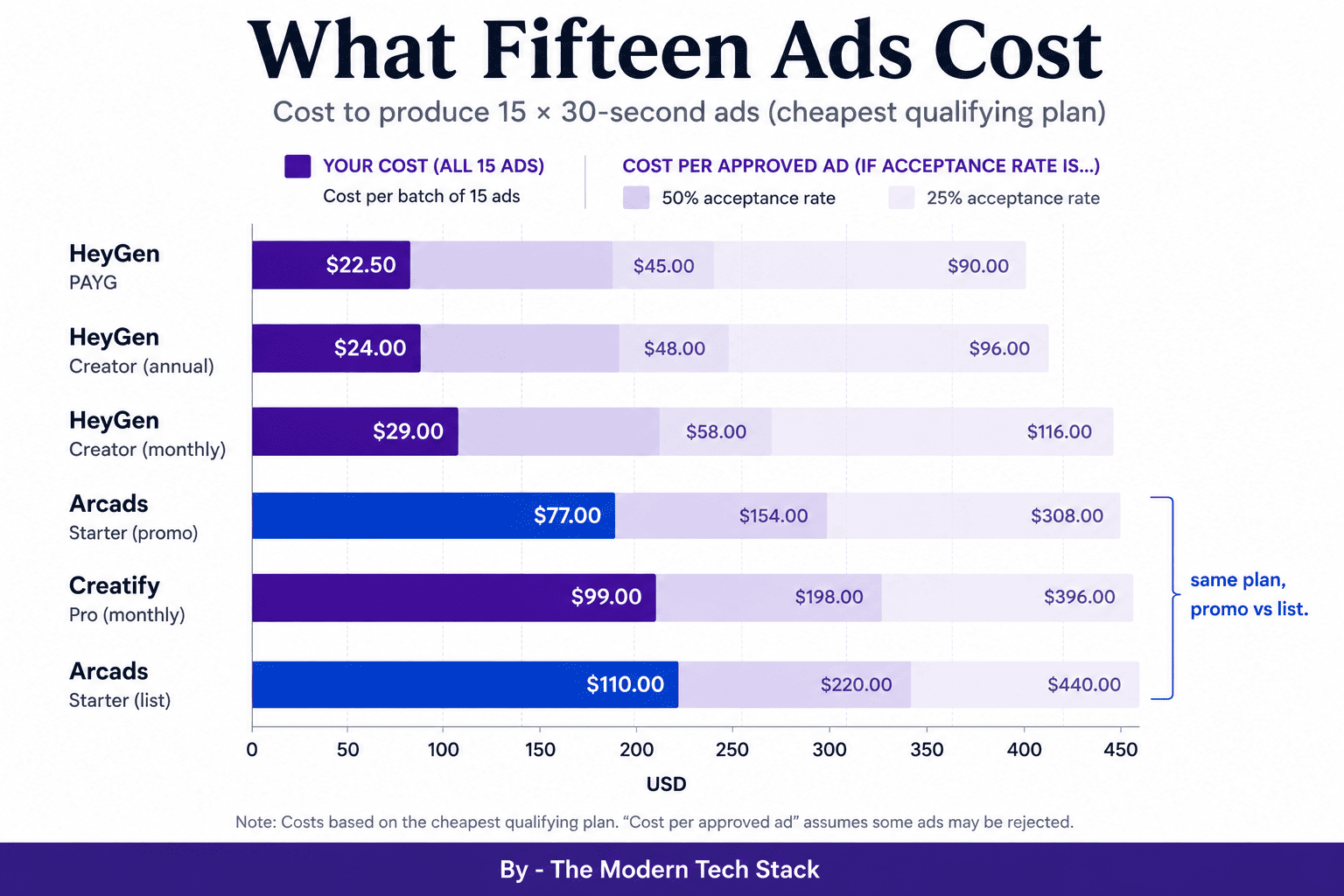
The Decision Criteria: Variant Generation Against Cost Per Ad
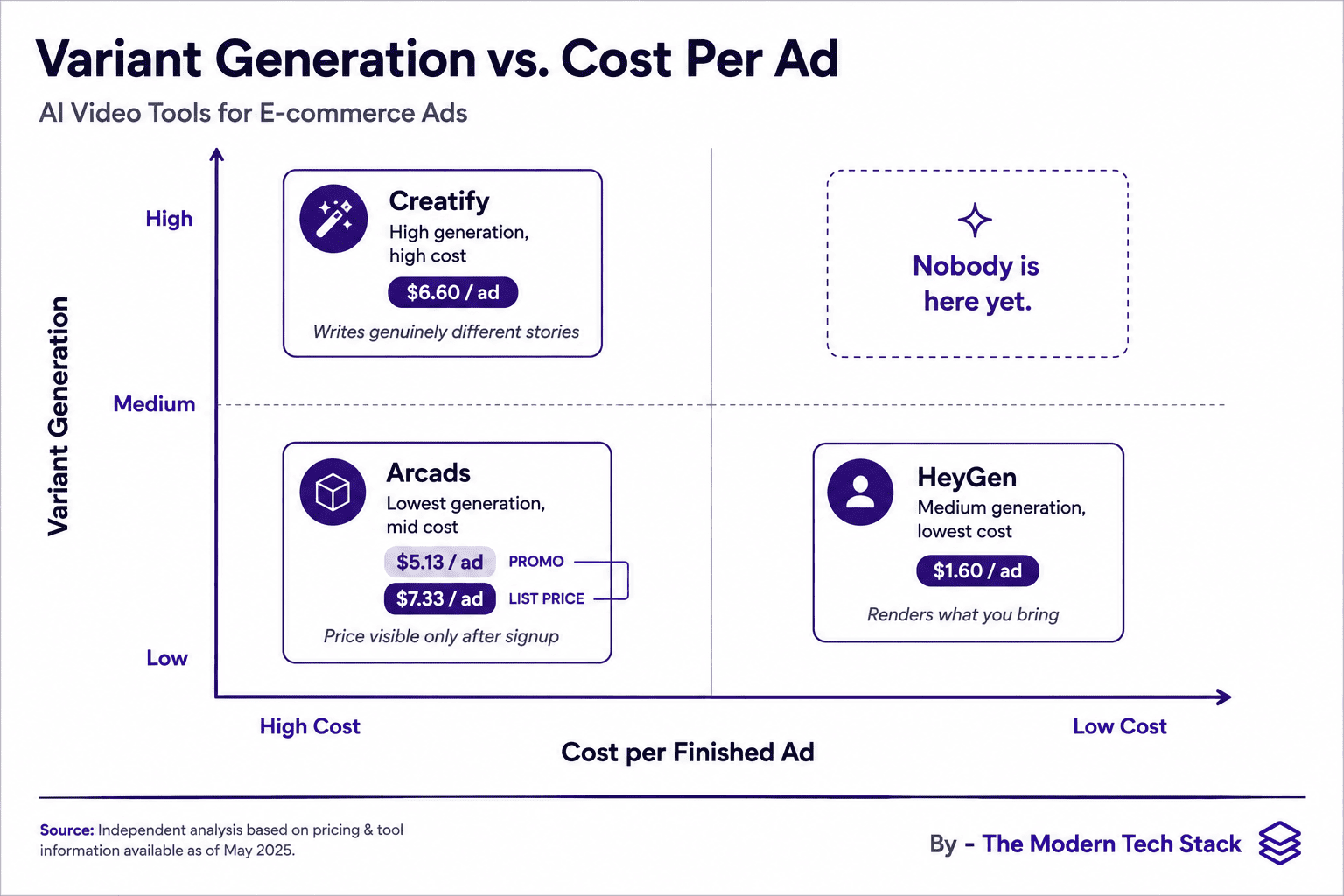
Realism separates these tools by a point. This axis separates them by a factor of four, and it is the only axis on which the two leaders genuinely disagree.Hook and variant generation is how much of the thinking the tool does — reading the product, finding the sensitive-skin angle and the makeup-friendly angle, and writing openings that are different arguments rather than different sentences. Cost per ad is what each finished thirty seconds actually costs once credit arithmetic is normalised.Creatify does the thinking and charges $6.60 an ad. HeyGen does the rendering, beautifully, and charges $1.60. Arcads sits between them on price at $5.13 and last on generation, which is the least comfortable position on this chart: you are paying three times HeyGen’s rate and still writing every hook yourselfWhich means the buying question is not “which tool is better.” It is: do you already know your angles?If you do have a strategist or an an agency (or a spreadsheet of hooks) then variant generation is a feature you are paying for and not using, and HeyGen is four times cheaper for identical throughput with better realism. If you do not, and the bottleneck is that nobody on your team has time to write five genuinely different arguments for the same SKU, then Creatify’s 9 on that criterion is the whole product and $99 is cheap against a copywriter’s day rate.
The Verdict in Full
On the rubric as a whole, HeyGen takes it at 8.2. The best avatar realism in the category, scene-level editing, a real batch workflow, and a cost per finished ad that is four times lower than its nearest competitor’s. It wins on price rather than on capability, and it does not write your ads. Buy it if you know what you want to say — and get its commercial licence terms in writing before you spend against them, because they are published nowhere.Creatify at 8 is the better product and the worse deal, and which matters is a question about your team. It is the only tool here that turns one prompt into genuinely different stories, and its 8.5 on asset blending is the best product-and-avatar integration I compared. It is also the only one that makes a fifteen-ad month cost $99, because the workload clears the Starter ceiling by fifty credits. If the thinking is your bottleneck rather than the rendering, pay it.Arcads at 7.1 is a specialist that hides its best argument. Good realism and blending on skincare specifically, script-level control, and hooks you write yourself. Its pricing is the surprise: $77/mo Starter works out at $5.13 an ad, undercutting Creatify — and none of that is visible until you have created an account, because there is no public pricing page and no free tier. Weigh two things before you sign up. The $77 is a limited-time 30% cut from a $110 list at which those same fifteen ads become the most expensive on this page, and unused credits evaporate every month unless you are on the $385 tier. Then read the licence: non-exclusive, personal, and explicit that a competitor using a similar script and the same model may generate a near-identical video.So the choice comes down to one thing. If you need something doing the thinking at scale — many angles, many SKUs, nobody free to write them — go for Creatify. If you have the time to think and want the best realism at the lowest cost, go for HeyGen.Pick the one that matches your workflow
Weekly cadence or a backlog, go with Vizard. Feed-ready framing above all, Submagic. Few Shorts, polished properly, Descript.Heygen
Creatify
Arcads
Sources
- The brief – Summer Fridays ShadeDrops Broad Spectrum SPF 50 Mineral Milk Sunscreen — $38, 50ml, zinc oxide 5.93% / titanium dioxide 5.46%, “93% agreed it layered well under makeup”
- IAB and PwC, Internet Advertising Revenue Report: Full Year 2025 — published 16 April 2026, US full-year actuals
- IAB, U.S. Digital Video Ad Spend to Surpass $80B in 2026 — Digital Video Ad Spend & Strategy Report Part One, 5 May 2026
- IAB 2026 Outlook Study, CTV forecast +13.8% — 29 January 2026
- Creative performance — the citable set
- TikTok, The Creator Advantage — November 2025, internal analysis of third-party creator content, Feb 2024–Jan 2025
- TikTok, Triple-digit conversion lift: simple creative tips — machine-learning analysis of thousands of ads, validated per region
- Kantar for Google, YouTube Creator Marketing Playbook — 2026 meta-analysis, 20 campaigns, 10 verticals, n=4,342, 95% confidence
- Meta, Reels ads performance, quoted with attribution in Adobe’s Reels best-practice guide — no sample size disclosed
- Collabstr via eMarketer, UGC collaborations up 133% YoY — 21,000+ collaborations, 200,000 creators