AI Visibility Audit: A Step-by-Step Template
| Free excel templateUse this sample template to audit brand visibility across Google AI Overviews and monitor brand mentions over time. |
What is an AI visibility audit?
- Are we mentioned for the questions that matter commercially?
- Is our website cited as a source?
- Is what AI says about us accurate?
- How are we described: positively, neutrally, or negatively?
- Who’s mentioned instead of us, and which sources are cited?
What do you need before you start?
- Time: 2–4 hours for a first audit of 30 prompts across three engines
- Tools: A spreadsheet (use the template above), a browser with private windows, and accounts or free access to the AI engines you’ll test
- Inputs: Your list of three to five main competitors and a short list of the facts AI should get right about you (services, pricing, locations, who you serve)
Step 1: How do you build a prompt set by buying stage?
Why organize by buying stage
Buyers ask different questions at different points. Someone early in their research asks about the problem; someone close to buying asks for comparisons. You might be highly visible for one stage and invisible for another, and the fix differs for each.The four stages
Stage | What the buyer is asking | Example (B2B bookkeeping firm) | Share of prompts |
|---|---|---|---|
Problem | What’s wrong, and how do I fix it? | “Why are my restaurant’s food costs higher than expected?” | 20% |
Category | What kind of solution do I need? | “Should a restaurant use an in-house bookkeeper or an outsourced firm?” | 25% |
Shortlist | Who are the best options? | “Best bookkeeping firms for restaurants in Texas” | 35% |
Comparison | How do specific options compare? | “[Your firm] vs [Competitor] for restaurant bookkeeping” | 20% |
How to write good prompts
- Use your buyers’ words. Pull phrasing from sales call notes, support tickets, reviews, and the “People also ask” boxes in Google.
- Write conversationally. “What’s the best CRM for a 20-person agency that uses HubSpot for email?” not “best CRM agency.” Peec AI’s documentation makes the same point: prompts are questions, not keywords.
- Include constraints buyers actually have: budget, team size, location, industry, existing tools.
- Don’t name yourself in the first three stages. Prompts that name your brand tell you only how AI describes you, not whether it recommends you unprompted. Save branded prompts for the comparison stage and an accuracy check.
- Vary the phrasing. Research by SparkToro and Gumshoe.ai found that people almost never phrase prompts the same way, even when they want the same thing. Two or three versions of key questions give a more realistic picture.
How many prompts?
- First audit, small business: 20–30 prompts
- Mid-sized company: 40–60 prompts
- Agency client audit: 30–50 prompts per client, using a consistent structure
Step 2: How do you fix your engines and settings?
Choose your engines
Pick the two to four engines your buyers most likely use. For most businesses:- ChatGPT (with search on): the most widely used AI assistant
- Google AI Overviews: appears in standard Google results
- Google AI Mode: Google’s conversational search
- Perplexity or Copilot: add whichever is more relevant to your audience
Fix the settings
Record these in the template’s Settings Log tab and keep them the same every month:Setting | Recommended | Why |
|---|---|---|
Logged in or out | Logged out or a fresh account, where possible | Avoids personalization from chat history and memory |
Session | New chat for every prompt | Prevents earlier prompts from affecting later answers |
Web search | On (ChatGPT, Copilot) | Reflects what most buyers now see |
Location | Your main market (use a VPN if you’re elsewhere) | Results vary by country and city |
Device | Desktop, consistently | Simplifies comparison |
Model | Default; note the model name if shown | Model updates can shift results |
Runs per prompt | 2–3 for shortlist prompts; 1 for others | AI answers vary between runs |
Why multiple runs matter
AI answers vary by design. The SparkToro study found less than a 1 in 100 chance that ChatGPT or Google’s AI would return the same list of brands twice for the same prompt. For your most important shortlist prompts, run each two or three times and record each run. You’ll score mention rate across runs, not a single yes or no.Step 3: How do you score every answer?
The four scores
1. Mention (0 / 1 / 2)- 0 = Not mentioned
- 1 = Mentioned in passing (“other options include…”)
- 2 = Recommended or featured (named as a top option, or described in detail)
- 0 = Your website not linked
- 1 = Your website linked as a source
- 0 = Contains a material error (wrong pricing, discontinued service, wrong location)
- 1 = Minor error or outdated detail
- 2 = Accurate
- −1 = Negative or cautionary
- 0 = Neutral
- +1 = Positive
Additional columns
- Competitors mentioned: list each competitor named
- Your position: where you appeared in the list, for reference only, because position is unstable
- Notes: anything unusual, such as an outdated description, a strong competitor claim, or an unexpected source
Summary metrics
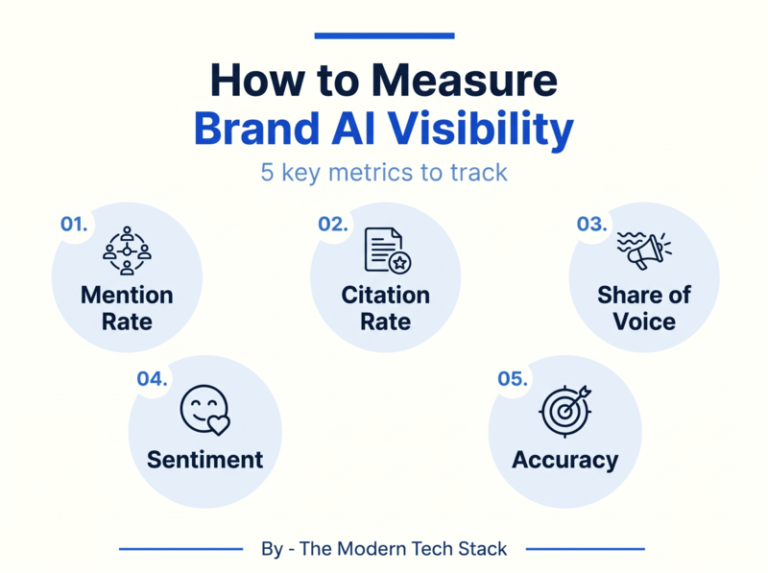
The template’s Summary tab calculates these for each engine:Metric | Formula |
|---|---|
Mention rate | Rows with mention ≥ 1 ÷ total rows |
Recommendation rate | Rows with mention = 2 ÷ total rows |
Citation rate | Rows with citation = 1 ÷ total rows |
Accuracy rate | Rows with accuracy = 2 ÷ rows where mentioned |
Net sentiment | Average sentiment where mentioned |
Share of voice | Your mentions ÷ (your mentions + competitors’ mentions) |
Step 4: How do you analyze the gaps?
Where are you missing by stage?
Pattern | Likely cause | Where to look |
|---|---|---|
Visible at problem stage, absent at shortlist | You’re cited for information but not included in recommendation sources | The roundups, directories, and review sites cited in shortlist answers |
Mentioned but rarely cited | AI knows you from third-party sources, but your own pages aren’t retrieved | Crawler access, page clarity, content depth |
Cited but rarely recommended | Your content is useful, but nothing connects it to a recommendation | Third-party reviews and mentions |
Absent everywhere | Low web presence or blocked crawlers | Technical access first, then presence |
Which sources keep appearing?
Sort the cited-sources column by frequency. The sites that appear repeatedly across shortlist prompts are your priority targets: these are the pages AI systems use to decide who to recommend in your category.What’s inaccurate?
List every accuracy score of 0 or 1. For each one, work out where the wrong information probably came from: an outdated directory listing, an old press article, or your own site. Corrections usually need to happen at that source.Who’s winning, and why?
For the competitor mentioned most often, look at which sources cite them that don’t cite you. That gap is often your clearest action list.Quick technical check
Before you conclude you have a content or reputation problem, confirm AI crawlers can reach your site. OpenAI states that sites must allow OAI-SearchBot, and that hosts or CDNs must allow its traffic, to be eligible for ChatGPT search. Check your robots.txt and CDN bot settings.Step 5: What does a worked example look like?
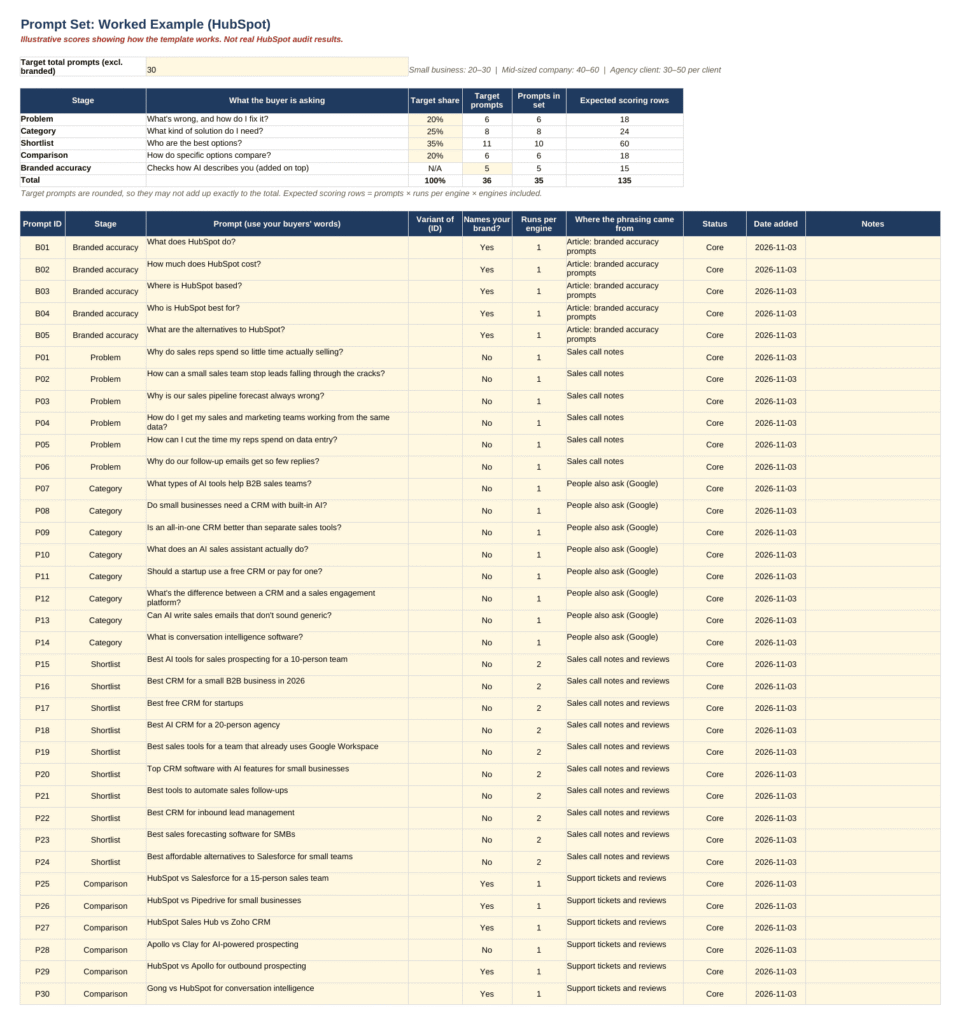
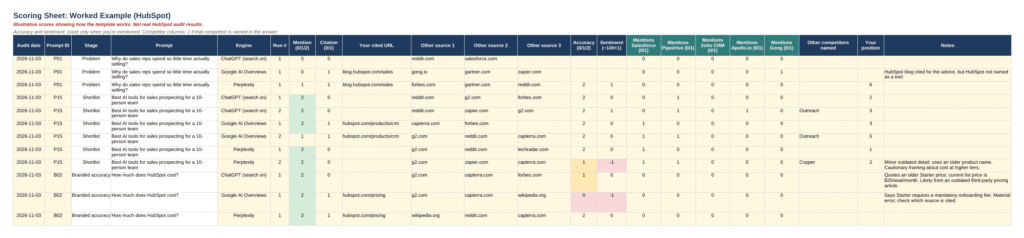
- Brand: HubSpot (hubspot.com). Category: AI tools for sales
- Competitors: Salesforce, Pipedrive, Zoho CRM, Apollo.io, Gong
- Prompt set: 30 prompts (6 problem, 8 category, 10 shortlist, 6 comparison), plus 5 branded accuracy prompts
- Engines: ChatGPT (search on), Google AI Overviews, Perplexity
- Settings: logged out, US location, desktop, new chat per prompt, 2 runs for shortlist prompts
- Date: November 3, 2026 (135 scored rows)
Metric | ChatGPT | AI Overviews | Perplexity |
|---|---|---|---|
Mention rate | 80% (32 of 40) | 62.5% (25 of 40) | 80% (32 of 40) |
Citation rate | 20% (8 of 40) | 35% (14 of 40) | 32.5% (13 of 40) |
Mention rate, shortlist stage | 20 of 20 | 15 of 20 | 17 of 20 |
Accuracy rate | 91.9% | 93.3% | 97.3% |
Top cited sources | Capterra (32), G2 (30), Zapier (30) | – | – |
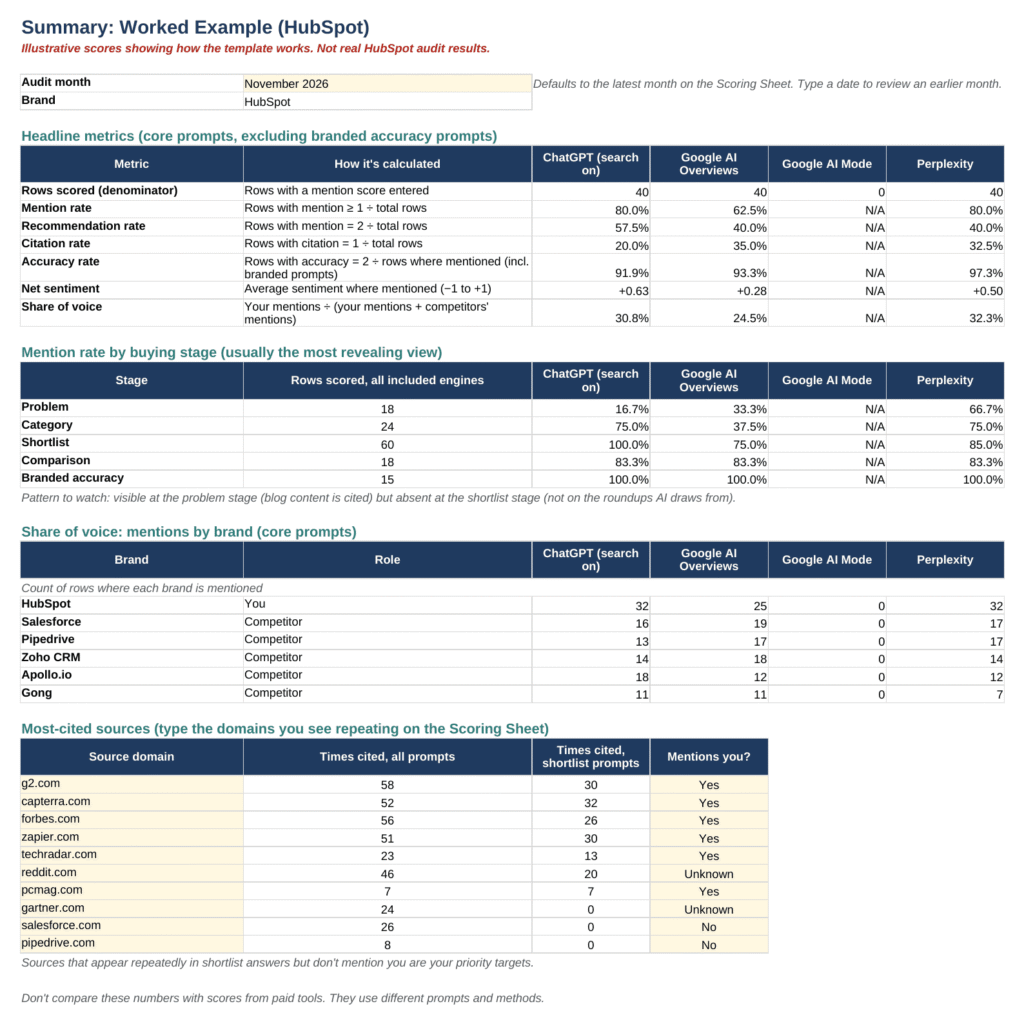
- Recommended at the shortlist stage, but rarely the cited source. HubSpot’s own pages were cited in 3 of 20 shortlist answers on ChatGPT, 4 of 20 on AI Overviews and 5 of 20 on Perplexity. Capterra, G2 and Zapier were cited most. Action: keep review profiles current and make sure HubSpot appears in the roundups these answers draw on.
- Cited for advice but not named at the problem stage. AI Overviews cited the HubSpot blog in 3 of 6 problem-stage answers without naming HubSpot, and ChatGPT mentioned HubSpot in 1 of 6. Action: where it’s relevant, link educational posts to the product use case they describe.
- Pricing answers contain errors. For “How much does HubSpot cost?”, ChatGPT quoted an older Starter price (minor error), and AI Overviews said Starter requires a mandatory onboarding fee (material error). Action: find the cited sources, ask for corrections to outdated third-party pricing pages, and make the pricing page’s per-seat Starter price easy to extract.
- AI Overviews is the weakest engine. HubSpot was mentioned in 25 of 40 rows on AI Overviews, compared with 32 of 40 on the other two engines. Salesforce was mentioned in 19 rows there. Action: review which pages AI Overviews cites for shortlist prompts and compare them with the sources ChatGPT and Perplexity use.
Step 6: How do you repeat the audit monthly and report per engine?
Monthly routine
- Run the same prompt set with the same settings (check the Settings Log).
- Score each answer in a new tab, or add a date column.
- Update the Monthly Trend tab.
- Note any changes you made that month (new listings, page updates, PR coverage) so you can see whether they line up with changes in results.
What to keep fixed and what to change
- Keep fixed: your core prompt set (at least 80% of prompts), engines, and settings.
- Allowed to change: add a few new prompts each quarter as your market changes. Mark them as new so they don’t distort trends.
How to report
Report each engine separately, and always show the denominator (how many prompts and runs the figure is based on).Sample monthly summary line:ChatGPT: mentioned in 9 of 30 prompts (30%), up from 6 (20%) last month. Recommended in 4. Cited in 5. One accuracy error (outdated pricing on a directory listing, now corrected). Shortlist-stage mention rate: 2 of 10.Don’t combine engines into one score, and don’t compare your audit numbers with scores from paid tools. They use different prompts and methods.When should you move from a manual audit to a tool?
- You need more than 50 prompts or more than three engines
- You need daily data to see the effect of specific changes
- You’re running audits for several clients
- Stakeholders want dashboards rather than spreadsheets
Frequently asked questions
What is an AI visibility audit?
A structured check of how AI assistants mention, cite, and describe your business for the questions your buyers ask, scored and repeated over time.
How do you audit AI visibility manually?
Build 20–30 prompts across four buying stages, run them in two to four AI engines with fixed settings, score each answer for mention, citation, accuracy, and sentiment, and repeat monthly.
How long does an audit take?
About 2–4 hours the first time for 30 prompts across three engines. Repeat audits take 1–2 hours once the template is set up.
How often should I run it?
Monthly is ideal. Quarterly is the minimum for spotting trends.
Can I use the same audit for clients?
Yes. Keep the structure (stages, scoring, settings) the same and change the prompts and competitors for each client. Consistency makes reports comparable over time.
Sources and References
- Ahrefs, AI Overview brand visibility factors (75K brands)
- SparkToro and Gumshoe.ai, AIs are highly inconsistent when recommending brands or products
- Peec AI, documentation
- Google Search Central, AI features and your website
- OpenAI Help Center, ChatGPT search