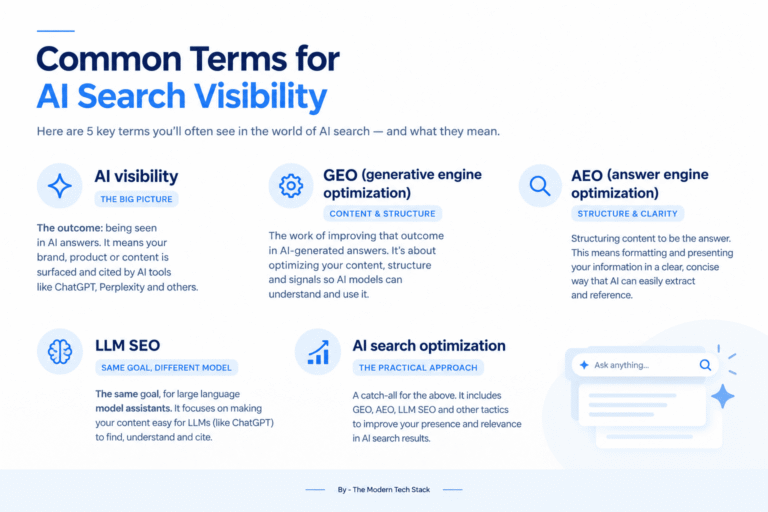
- Mentions: whether your brand is named in the answer
- Citations: whether your website is linked as a source
- Position and sentiment: where you appear in the answer and how you’re described
- Competitors: who else shows up, and how often
How do we evaluate AI visibility tools?
- Engines covered on each plan. Many vendors advertise nine or more engines, but only on the top tier. We report what the entry plan includes.
- Prompt limits and rerun frequency. Fifty prompts checked daily gives you a very different dataset from 50 prompts checked weekly.
- Data method. There are three approaches:
- Live prompts: the tool sends your prompts to each engine on a schedule and records the answers.
- Prompt index: the tool maintains a large pre-built library of prompts across a market and shows where you appear in it.
- Modeled: the tool estimates visibility from other signals. This is the least transparent, and we flag it wherever we find it.
- Seats. Per-user pricing can double or triple your bill once a second team joins.
- Verified price. Taken from the vendor’s own pricing page, with the date we checked.
Tool | Entry price | Prompts at entry | Engines at entry | Seats | Update frequency | Data method |
|---|---|---|---|---|---|---|
$29 (Lite) | 15 | ChatGPT, AI Overviews, Perplexity, Copilot; Claude, Gemini, AI Mode as add-ons | Unlimited | Daily | Live prompts | |
$20 (Essentials; $17/mo billed yearly) | Credit-based (120 credits, up to 480 answers) | 17+ listed | Team workspaces not included on Essentials | Hourly to monthly | Live prompts | |
$95 (Starter) | 50 | Choose 3 of 6 models | Unlimited | Daily | Live prompts | |
$199 (Starter) | 50 tracked prompts | ChatGPT, Google AI Mode, and others | Extra users from $45 | Daily (Brand Performance weekly) | Live prompts plus Semrush database | |
$250 (Core) | 125 (5,000 responses/mo) | ChatGPT, Perplexity, AI Overviews, Copilot | 5 | Not stated | Not stated | |
Free tier; $295 (Starter) | Credit-based (3,600 credits; 1 credit = 1 response) | 11 models on Starter | Unlimited | Not stated | Not stated | |
From $199 (Brand Radar AI); $699 all platforms | Check-based custom prompts; packs from $50 | AI Overviews, AI Mode, ChatGPT, Perplexity, Gemini, Copilot, Claude | Per Ahrefs plan | Daily custom prompts; index retested monthly | Prompt index plus custom prompts | |
Custom (free 7-day trial) | 50 fixed prompts on trial | Up to 9 engines on Enterprise | Unlimited | Daily | Live prompts |
- Engine caps. Peec AI’s Starter plan includes unlimited users, but you choose only three engines from its standard list. Perplexity appears only in the Enterprise model list.
- Add-on engines. Otterly keeps its entry price low by selling Claude, Gemini, and Google AI Mode as add-ons on every plan.
- Per-seat licensing. Semrush charges for additional users, from $45 a month each.
Buyer | Need | Lower-cost route | Mid-range route |
|---|---|---|---|
Solo founder | ~15 prompts, 3–4 engines, 1 user | Otterly Lite, $29 | Peec AI Starter, $95 |
3-person in-house team | ~100 prompts, 3+ engines, 3 users | Otterly Standard, $189 | Peec AI Pro, $245 (150 prompts); Semrush Pro+ ($299, 100 prompts) plus 2 extra users from $45 each ≈ $389 |
Agency, 5 clients | ~300+ prompts, multiple workspaces | Rankscale Pro+, $229 (credit-based) | Peec AI Advanced, $495 (350 prompts) |
Solo founder or small team (1–3 people)
Start free. Run a free AI visibility checker or a manual check of 15–20 buyer prompts to find out whether you have a visibility problem at all. Many small businesses find that the issue isn’t ranking but missing information: AI assistants simply don’t have enough about them to recommend.If you need ongoing tracking, there are two sensible routes:- Otterly.AI Lite ($29): 15 prompts, checked daily across four engines, with unlimited users. It’s the simplest setup. The limitation is the prompt cap. Fifteen prompts covers one service line well but won’t cover a broad catalog.
- Rankscale Essentials ($20): Credit-based rather than prompt-based, so you can spread checks across more engines or more prompts as needed. The trade-off is that credit systems are harder to budget for, and team workspaces aren’t included at this tier.
Mid-sized in-house team
At this size, the main question is who needs access. If marketing, content, leadership, and sales all want to see the data, unlimited seats matter more than anything else.- Peec AI Pro ($245): 150 prompts checked daily, unlimited users, and three engines of your choice. It’s well suited to companies that want one shared dashboard. Choose your three engines based on where your buyers actually search, not on what sounds impressive.
- Semrush SEO + AI Search ($199 Starter, 50 prompts): The strongest option if your SEO team already lives in Semrush. Having AI visibility data next to your keyword and site audit data is genuinely useful. Semrush’s AI Visibility Score compares your mentions against the median for automatically identified competitors, which is helpful context, but it means your score depends on who Semrush thinks your competitors are.
- Ahrefs Brand Radar: Best for teams that want a market-wide view without writing hundreds of prompts. Its AI Visibility Index draws on a library of 512 million prompts, retested monthly, alongside a small number of custom prompts you choose. That makes it good for spotting category trends and weaker for tracking your exact buyer questions day to day.
Agency
Agencies need three things that in-house teams can often skip: separate client workspaces, exportable or white-label reports, and pricing that scales without per-seat costs.- Peec AI: Unlimited users on every plan and a clear price ladder ($95 / $245 / $495) make it easy to quote clients. Check that the three-engine limit works for each client’s market.
- Rankscale: Team workspaces from the Pro tier upward and a credit model that lets you give small clients small allocations. Page audits are included from Pro, which helps when you need to show a client what to fix.
- Profound: Offers dedicated agency plans with credits per client workspace. Its engine coverage is the widest we found, but pricing isn’t published, so get a quote early.
Enterprise
If you need nine or more engines, custom prompt volumes, regional tracking, and procurement support (security reviews, SSO, contracts), the realistic shortlist is:- Profound Enterprise: Lists nine engines, including ChatGPT, Perplexity, Google AI Mode, Gemini, Copilot, DeepSeek, Claude, AI Overviews, and Exa Search, with daily tracking and editable prompt sets.
- Scrunch Enterprise: Lists nine models, including Meta AI and Grok, with custom prompt and response allowances.
- AthenaHQ Enterprise: Credit-based (one credit per AI response) with unlimited seats and role-based access control.
- Otterly.AI. Best for: small teams that want a low, predictable price. Strengths: lowest entry price among the dedicated tools, unlimited team members, daily checks. Watch for: engine add-ons, and the 15-prompt cap on Lite. Full profile
- Rankscale. Best for: budget-conscious teams and agencies that want broad engine coverage. Strengths: 17+ engines listed, flexible credits, page audits on higher tiers. Watch for: credit consumption is harder to forecast than a fixed prompt count. Full profile
- Peec AI. Best for: in-house teams and agencies that want shared access. Strengths: clear pricing, unlimited users, daily updates, integrations for AI crawler analytics. Watch for: three-engine limit below Enterprise. Full profile ·
- Semrush. Best for: existing Semrush customers. Strengths: AI data alongside SEO data, prompt research, AI-focused site audit. Watch for: extra-user costs and a 50-prompt limit on Starter. Full profile
- Ahrefs Brand Radar. Best for: market and competitor research at scale. Strengths: a very large prompt index, seven platforms covered for custom prompts. Watch for: usage counts per prompt, per platform, per location, so multi-market tracking adds up quickly. Full profile
- Scrunch. Best for: mid-market teams moving toward enterprise. Strengths: 125 prompts and 5,000 responses on Core. Watch for: five user licenses on Core, and no published data on update frequency. Full profile
- AthenaHQ. Best for: teams that want to try before paying. Strengths: a free tier, 11 models on Starter, unlimited seats. Watch for: credits are consumed per response, so tracking many engines uses them quickly. Full profile
- Profound. Best for: enterprises and large agencies. Strengths: widest engine list, daily tracking, agency workspaces. Watch for: no published self-serve pricing, and trial prompts can’t be customized. Full profile
Which AI search visibility tool is best for a small business?
The one that covers the engines your buyers use at a price you’ll keep paying. For most small teams, that means a free checker first, then a low-cost tracker with 15–50 prompts.
How do AI search visibility tools get their data?
Most send live prompts to each AI engine on a schedule and analyze the answers. Some, like Ahrefs, also use a large pre-built prompt index. None of them can see real user conversations.
Which engines should I track for ai search visibility?
Start with the two or three your buyers actually use. For most B2B and local service businesses, that’s ChatGPT and Google’s AI Overviews, then Perplexity or Copilot depending on your audience.
What does an AI visibility score mean?
It usually shows how often your brand appears across the tool’s prompt set, compared with competitors. Because each tool uses different prompts and engines, you can’t compare scores across tools. See how AI visibility is measured.
Do I need a paid tool to start?
No. A manual check of 20–30 prompts tells you a lot. Our AI visibility basics guide shows where to begin.