How to Track ChatGPT and AI Referral Traffic in GA4
How does AI traffic reach your analytics?
- Referrer: the browser tells your site which page the visitor came from (for example,
perplexity.ai). - UTM parameter: the AI platform adds a tag to the link (for example,
?utm_source=chatgpt.com). - Neither: the visit arrives with no source information and is recorded as Direct.
Which AI platforms pass referrers?
Platform | Web browser | Mobile / desktop app | Notes |
|---|---|---|---|
ChatGPT | Referrer and/or | Often arrives as Direct | OpenAI adds |
Perplexity | Referrer passed consistently | Mostly passed | Generally the most reliable AI platform for attribution |
Gemini | Referrer from | Often arrives as Direct | Web visits appear as a referral, not organic search |
Copilot | Referrer usually passed | Varies | Check for both |
Claude | Referrer passed inconsistently | Often arrives as Direct | No UTM tagging |
Google AI Overviews | Appears as | Same | Can’t be separated from organic search in GA4 |
Google AI Mode | Often Direct or | Same | Can’t be reliably separated in GA4 |
What happened in the October 2026 ChatGPT outage?
utm_source=chatgpt.com, and many arrived with no referrer, so analytics recorded them as Direct. Search Engine Roundtable reported the change on October 14. According to Sitebrunch’s update, OpenAI confirmed it was a bug and rolled out a fix from October 15, and almost all ChatGPT links carried the tag again from October 16.What this means for your reports: If you see a dip in ChatGPT traffic and a spike in Direct around October 9 to 16, 2026, it’s very likely this bug, not a real change. Annotate it in your reports. Visits from that week stay in your data as Direct.The broader lesson: A single platform change can make AI traffic disappear from your reports overnight. Monitor your AI channel weekly so you notice quickly.GA4 setup, part 1: How do you use the built-in AI Assistant channel?
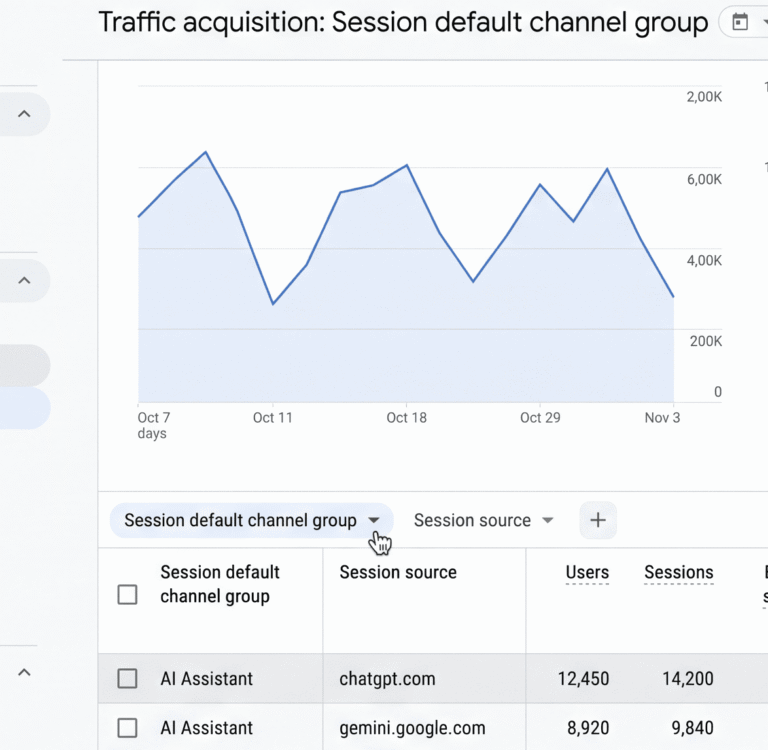
ai-assistant and the campaign to (ai-assistant). Practitioner reports date the rollout to May 13, 2026.How to find it
- Go to Reports → Acquisition → Traffic acquisition.
- Make sure the primary dimension is Session default channel group.
- Look for the AI Assistant row.
- To see which assistants, add a secondary dimension: Session source.
Its limits
- It depends on a referrer. Visits without a referrer (apps, copied links) still go to Direct.
- Google doesn’t publish its full list of recognized assistants. Newer or smaller assistants may land in Referral.
- It excludes Google’s own AI features. AI Overviews and AI Mode clicks aren’t included.
- You can’t edit it. Google maintains the default channel group, and it can’t be changed.
- No history before rollout. Sessions before the channel existed were classified under the old rules (usually Referral).
GA4 setup, part 2: How do you build a custom channel group?
Step-by-step
- Go to Admin → Data display → Channel groups.
- Click Create new channel group, or copy the default group so you keep all the standard channels.
- Name it, for example “Channels incl. AI.”
- Click Add new channel and name it AI Assistants.
- Set the condition: Source → matches regex → paste the expression below.
- Add a second condition with OR: Medium → exactly matches →
ai-assistant. - Reorder: drag the AI Assistants channel above Referral (and above Unassigned). GA4 evaluates channels from top to bottom, so if Referral comes first, it will capture AI traffic before your rule does.
- Save.
Regex
^(.*\.)?(chatgpt\.com|openai\.com|perplexity\.ai|gemini\.google\.com|copilot\.microsoft\.com|copilot\.com|claude\.ai|chat\.mistral\.ai|deepseek\.com|grok\.com|meta\.ai|you\.com|notebooklm\.google\.com)$|^(chatgpt\.com|openai|perplexity|gemini)$What it covers: ChatGPT (including the utm_source=chatgpt.com tag), Perplexity, Gemini, Copilot (old and new domains), Claude, Mistral’s Le Chat, DeepSeek, Grok, Meta AI, You.com, and NotebookLM.Notes:- GA4 regex matching is case-sensitive and matches the whole value. Test against your actual source values in an exploration first.
- Review the list quarterly. Check your Referral report for new AI domains and add them.
- Avoid broad patterns like
.*ai.*or.*gpt.*. They match unrelated sites (any domain containing “ai”) and inflate your numbers.
Why custom groups are worth it
Custom channel groups apply retroactively, so you can see AI traffic for periods before the built-in channel existed. You also control the definition, which matters when you report to someone who asks, “What exactly counts as AI traffic?”GA4 setup, part 3: Which explorations should you build?
Exploration 1: AI traffic by assistant and landing page
- Go to Explore → Free form.
- Dimensions: Session source, Landing page + query string, your custom channel group.
- Metrics: Sessions, Engaged sessions, Engagement rate, Key events, Total revenue (if relevant).
- Filter: custom channel group exactly matches “AI Assistants.”
- Rows: Landing page. Columns: Session source.
Exploration 2: AI traffic quality vs other channels
- Free form, with rows set to Session default channel group (or your custom group).
- Metrics: Engagement rate, Average engagement time per session, Key events per session, Session key event rate.
Exploration 3: Suspected AI traffic in Direct
You can’t attribute traffic that arrives without a source, but you can watch for signs.- Free form, filtered to Session default channel group = Direct.
- Dimensions: Landing page, Device category.
- Look for deep pages (not your homepage) getting unusual Direct traffic, especially on mobile, and especially pages you know AI assistants cite.
Can you track traffic from AI Overviews?
google / organic. The GA4 AI Assistant channel explicitly excludes AI Overviews and AI Mode.What you can do:- Use Search Console’s generative AI performance report. Since August 31, 2026, Search Console has shown impressions in AI Overviews and AI Mode by page, country, device, and date. The report lists impressions only, not clicks.
- Compare pages. Pages with rising AI impressions in Search Console and changing organic traffic in GA4 can show the indirect effect of AI features.
- Track AI Overview presence with a tool. See how to track Google AI Overviews and AI Mode.
What can’t be measured?
Gap | Why | What to do |
|---|---|---|
App traffic without referrers | Apps often strip the source | Watch deep-page Direct traffic as “suspected” |
AI Overviews and AI Mode clicks | Same referrer as organic | Use Search Console’s AI report for impressions |
Answers that don’t produce a click | No visit happens | Track mentions with prompt testing or tools |
Influence on later visits | Buyer reads an AI answer, searches your brand later | Watch branded search trends and ask “how did you hear about us?” |
Platform changes | Referrer and UTM behavior changes without notice | Monitor weekly; annotate anomalies |
How should you report AI traffic to stakeholders?
1. Confirmed AI referral traffic
Source | Sessions | Engagement rate | Key events | Change vs last month |
|---|---|---|---|---|
ChatGPT | ||||
Perplexity | ||||
Gemini | ||||
Copilot | ||||
Claude | ||||
Other AI | ||||
Total AI | ||||
AI as % of all sessions |
Other report sections
- Top AI landing pages (top 10, with sessions and key events)
- AI traffic quality vs other channels (engagement rate and key event rate: AI vs organic vs referral)
- Google AI features (Search Console AI impressions, top pages, change vs last month)
- Suspected AI traffic (deep-page Direct traffic trend, clearly labeled as unconfirmed)
- Notes and anomalies (platform changes, tracking issues such as the October 2026 ChatGPT bug, setup changes)
- Self-reported attribution (count of “AI assistant” answers on forms and sales calls)
Reporting rules
- Never combine confirmed and suspected traffic.
- Show AI as a share of total sessions. It’s usually small and presenting it honestly builds credibility.
- Lead with quality, not volume. If AI visitors convert at a higher rate, that’s the story.
- Keep visibility and traffic separate. Mention rate (from prompt tracking) and referral sessions (from GA4) measure different things. See how AI visibility is measured.
Frequently asked questions
How do I track ChatGPT traffic in GA4?
Check the built-in AI Assistant channel in Traffic acquisition, with Session source as a secondary dimension. For fuller coverage, create a custom channel group with a regex that includes chatgpt.com, and place it above Referral.
Can I track traffic from AI Overviews?
Not separately in GA4: AI Overviews clicks appear as Google organic. Use Search Console’s generative AI performance report for AI Overview and AI Mode impressions by page.
Why does my ChatGPT traffic look low?
Many ChatGPT visits, especially from mobile and desktop apps, arrive without referrer data and are recorded as Direct. Short-term dips can also come from platform changes, such as the October 2026 bug.
Does GA4 have an AI channel?
Yes. GA4’s default channel group includes an AI Assistant channel for recognized AI assistants. It excludes Google’s AI Overviews and AI Mode, and it can’t be edited.
What regex should I use for AI traffic in GA4?
Use a specific list of AI domains rather than broad patterns. The regex in this guide covers the major assistants. Test it against your own source values and update it quarterly.
Sources and References
- Google Analytics Help, Default channel group and Custom channel groups
- Search Console Help, Generative AI performance report
- Google Search Central, AI features and your website
- SearchPilot, How does AI traffic show up in analytics?
- Search Engine Roundtable, OpenAI drops UTM parameters from ChatGPT results
- Sitebrunch, ChatGPT without referrer and UTM
- Clique Studios, GA4 AI Assistant channel