AI Market Intelligence

Lead Intelligence Platforms for Small B2B Teams: How to Pick One That Finds the Right Leads

Most small B2B teams don’t have a shortage of leads. They have a focus problem. Any contact database will give you thousands of names, but the hard part is knowing which handful are worth a conversation this week, and reaching them with something relevant to say. That’s the job lead intelligence platforms are built to do, and it’s the part of sales that AI has changed most in the past two years.In this guide, we explain what lead intelligence is, where it fits in a small team’s sales process, and how to choose a platform without overbuying. Our short answer: founders and lean teams should start with Apollo or Lusha, teams that want AI to do the research and watch for buying signals should look at Clay, Amplemarket, or Unify, and phone-heavy or larger teams can evaluate Cognism or ZoomInfo. The rest of this article explains how to tell which one fits you.

What is lead intelligence?

Lead intelligence is the work of finding the right buyers, understanding why they might be ready to talk, and getting their details into your sales workflow. A lead intelligence platform does three things. It finds people who match your ideal customer profile, it ranks them using evidence such as hiring, funding, website visits, or job changes, and it delivers verified emails and phone numbers to your CRM or outreach tool. The benefit is simple: your team spends less time researching and more time talking to people who are likely to buy.For most of the last decade, this meant a large contact database with search filters. That’s changing quickly. AI can now read a company’s website, news, and job posts to judge whether it fits. It can monitor accounts and flag the ones that just became relevant, explain why a lead was ranked highly, and draft the first message. Sales intelligence is the broader category that also covers deal and call insights, but for a small team, lead intelligence is usually where AI pays off first.

Where does lead intelligence fit in your sales process?

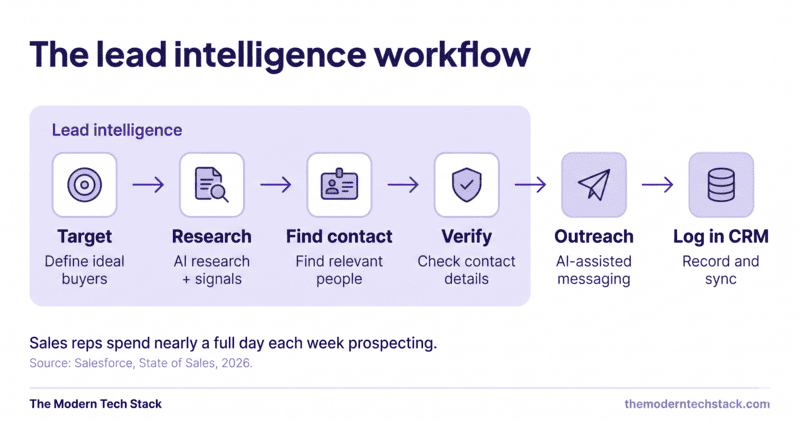
Think about a typical week for a founder or a first sales hire. They decide who to target, research each account, find the right person, track down a working email, write a message, and log everything in the CRM. According to Salesforce’s 2026 State of Sales research, reps spend nearly a full workweek day on prospecting, and 48% say they still lack the bandwidth for adequate cold outreach.A lead intelligence platform sits at the very start of that chain, before outreach, before the CRM, and before the first call. When it works, every step after it gets easier because the list is smaller, better targeted, and already researched. When it doesn’t, reps end up cleaning data, chasing bounced emails, and contacting people who were never a fit.AI is what’s making this front end more capable. The same Salesforce survey found that 87% of sales organizations already use some form of AI, and sellers expect AI agents to cut prospect research time by 34% once fully in place. Gartner predicts that by 2027, 95% of sellers’ research workflows will begin with AI, up from less than 20% in 2024.The gains aren’t automatic, though. Gartner also found that AI saves sellers nearly five hours a week, yet 72% of sales organizations don’t reinvest that time in high-value work. That’s the most useful lesson for a buyer: the right platform isn’t the one with the most AI features. It’s the one whose AI output your team actually acts on.

What does AI-native lead intelligence look like?
ai in lead intelligence
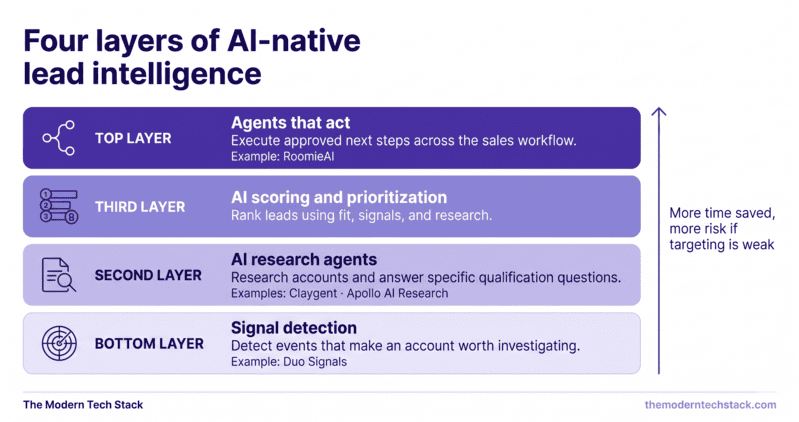
Nearly every vendor now says it uses AI, so it helps to know what the useful capabilities look like in practice. We see four that matter for a small team.AI research agents do the account homework a rep would otherwise do by hand. You ask a question, such as “Does this company sell to hospitals?” or “Have they announced a new office this year?”, and the agent reads public sources and returns an answer. Clay’s Claygent, Apollo’s AI Research, Cognism’s AI company research, and Common Room’s RoomieAI all work this way. The quality test is whether the answer shows its source, so a rep can check it in seconds.Signal detection watches for events that suggest timing, such as a job change, a funding round, a hiring spike, a website visit, or a jump in research activity on a topic you care about. Several vendors, including Cognism and Common Room, license intent data from Bombora for the topic-research piece. A signal is a reason to look, not proof that someone is ready to buy, so it’s worth knowing where each signal comes from and how old it is. We cover this in more depth in What Are Sales Signals, and Which AI Tools Detect Buying Intent?AI scoring and prioritization ranks your accounts and contacts so reps know where to start. Apollo offers AI lead scoring on its Professional plan and above, Common Room lists AI scoring, and Lusha offers AI recommendations. Good scoring tells you why something ranked highly. A number without a reason is hard to trust and easy to ignore.Agents that act go one step further and turn research and signals into outreach. Amplemarket’s Duo and AI Agents, Unify’s AI copywriting and sequencing, and Apollo’s agents can draft personalized messages or start sequences, with or without a person approving each one. These save the most time, but they also carry the most risk if the targeting underneath is weak. For agent-led tools specifically, see Which AI Lead Generation Tools Actually Find Good B2B Leads?

How do you choose the right lead intelligence platform?

Once you know you need a platform, the choice comes down to four questions. Answer them in order, because each one narrows the field for the next.First, does it know your market? Coverage varies a lot by region, industry, and job title. A platform with a huge database is not useful if it can’t find the operations managers at mid-sized logistics companies you sell to. The quickest way to check is to search for accounts you already know well and see whether the right people appear, including tricky cases such as subsidiaries, unusual titles, and people who recently changed roles.Second, does its AI explain itself? When the platform flags an account, it should tell you what happened, when it happened, and where the information came from. When its research agent answers a question, you should be able to see the source. If the AI only produces a score or a confident paragraph with nothing behind it, your reps will either ignore it or trust it blindly, and neither is good.Third, will it fit your daily workflow? The platform has to get records into your CRM and outreach tool without creating duplicates, overwriting good data, or losing track of who owns each lead. If your process relies on a browser extension, check what it does. LinkedIn’s User Agreement prohibits scraping and unauthorized automation, and a vendor’s extension listing alone doesn’t prove every use is permitted.Fourth, what will a usable contact really cost? Headline prices rarely tell the full story. Phone numbers usually cost several times more than emails, annual plans often require payment upfront, and some tools need a higher tier before they connect to your CRM. We break down the numbers platform by platform below.One more question sits behind all four: who will run it? Simple databases like Apollo and Lusha work out of the box for a founder. Flexible platforms like Clay can do far more, but they need someone comfortable building and maintaining workflows.

Which lead intelligence platforms should be on your shortlist?

We grouped eight platforms by the kind of job they do best. The first group is established contact databases that have added AI on top. The second is AI-native platforms built around research, signals, and agents. This shortlist is based on each vendor’s current public documentation, not on our own coverage testing, so treat it as a starting point for your evaluation.

Contact databases with AI built in

Apollo is the most complete starting point for a founder or a small team. It combines a large contact database with AI Research, AI lead scoring, intent topics, email sequences, and CRM integrations in one product. The free plan includes 900 credits per seat per year, granted monthly, and Basic costs $49 per seat per month billed annually with 30,000 credits per year granted upfront. Professional, at $79 per seat per month, adds AI lead scoring with unlimited scoring (Apollo pricing). For a deeper look at alternatives, see Apollo Alternatives: Which Contact Database Fits a Lean Sales Team?Lusha suits teams that mainly need to find and export contacts quickly. Its AI features are lighter but practical: AI search lets you describe the contacts you want in plain language, AI recommendations suggest leads and accounts, and higher plans add buying-intent topics and signals such as job changes. The free plan includes 40 credits a month, and Starter costs $37.45 per month billed yearly with 4,800 credits per year (Lusha pricing).Cognism is worth evaluating if your team relies on phone outreach. Its Pro plan adds verified mobile numbers on demand and buying intent based on Bombora data, with up to 12 intent topics, and both plans include AI company research. Pricing is custom-quoted, with five seats included on each package. One credit reveals one contact, and the same credits work across the platform, enrichment, and API (Cognism pricing).ZoomInfo is the category’s best-known name and is built for larger teams with a clear, proven need. Paid plans are custom-quoted and billed annually, with price depending on seats, credits, features, integrations, and contract length. Its GTM.AI layer uses separate data and AI credits. Small teams can try ZoomInfo Lite for free with 10 credits a month (ZoomInfo pricing explainer). For stage-based options, see ZoomInfo Alternatives: What Should You Pick at Each Company Stage?

AI-native research and signal platforms

Clay is less a contact database and more a workshop for building your own lead intelligence. It pulls data from many providers in a waterfall, so if one source has no email, it tries the next. Its Claygent agent can research almost any custom question across the web. The Growth plan adds web intent signal tracking and CRM auto-sync. Clay has a free plan, and Launch starts at $185 per month on monthly billing, or $167 per month billed annually (Clay pricing). It’s the most flexible option on this list, but it needs an operator. For when it’s worth it, see How Does Clay Data Enrichment Work, and When Is It Overkill? and Clay Alternatives for GTM Teams: Cheaper or Simpler Ways to Enrich Leads.Amplemarket combines data, AI signals, and outreach in one system. Duo Copilot, Duo Signals, and Duo Copywriter monitor buying intent and help write personalized emails, and an AI Agents add-on can find buyers, research prospects, and personalize outreach. The Startup plan costs $600 per month on an annual term for two users, which works out to $7,200 a year, and includes 13,500 email credits and 600 phone credits per user per year (Amplemarket pricing). It suits teams ready to commit to an all-in-one outbound system.Unify is a newer AI-native platform that builds outreach around signals. It draws on more than 40 data sources and tracks signals such as news and company events, social activity, and, on the Business plan, website intent and product usage. It also includes agentic chat, account research, and AI copywriting. There is a free plan, and Base costs $20 per seat per month with 800 credits per seat, billed monthly (Unify pricing). Monthly billing makes it one of the easier AI-native tools to try without a long commitment.Common Room focuses on signals from places where buyers already engage, such as your website, community, and social channels. It offers RoomieAI research, AI scoring, Bombora intent topics, job-change tracking, custom signals, and website visitor identification. Essential costs $2,500 per month billed annually (Common Room pricing), so it’s best for teams with real community or product activity to act on rather than for a founder building a first list.

The shortlist at a glance

Platform

Best for

Key AI capabilities

Entry price

Apollo

Founders and lean teams wanting one tool

AI Research, AI lead scoring, intent topics, agents

Free; Basic $49/seat/month, billed annually

Lusha

Fast contact finding and export

AI search, AI recommendations, signals

Free; Starter $37.45/month, billed yearly

Cognism

Phone-heavy outreach

AI company research, Bombora intent

Custom quote; five seats included

ZoomInfo

Larger teams with proven needs

GTM.AI, intent, configurable signals

Free Lite; paid plans custom, annual

Clay

Teams with an operator who wants custom research

Claygent agent, provider waterfalls, web intent

Free; Launch from $185/month

Amplemarket

All-in-one AI outbound

Duo Copilot, Duo Signals, AI Agents add-on

Startup $600/month, annual term

Unify

Signal-based outreach on monthly terms

Agentic chat, account research, AI copywriting

Free; Base $20/seat/month

Common Room

Teams with community or product signals

RoomieAI research, AI scoring, intent

Essential $2,500/month, billed annually

What does a contact actually cost?

Comparing plan prices doesn’t tell you much, because each platform packages credits differently. A more useful comparison is the approximate cost of one email and one phone number at each platform’s entry paid plan. We calculated these by dividing the published plan price by its included credits, then multiplying by the published credit cost for each action.

Platform

Plan used

Approx. cost per email

Approx. cost per phone

Notes

Apollo

Basic, $588/seat/year, 30,000 credits

$0.02

$0.16

1 credit per email, 8 per phone

Lusha

Starter, $449.40/year, 4,800 credits

$0.09

$0.47

1 credit per email, 5 per phone

Unify

Base, $20/seat/month, 800 credits

$0.03

$0.10

Averages of 1 and 4 credits; rare cases up to 10 and 20

Clay

Launch, $185/month, 2,500 Data Credits

About $0.07 per Data Credit

Varies

Credits per lookup depend on the data provider used

Amplemarket

Startup, $7,200/year, two users

Up to $0.27

Not separable

Price includes outreach tools, so the data cost is overstated

Cognism

Custom quote

Quote-based

Quote-based

1 credit reveals one contact

ZoomInfo

Custom quote

Quote-based

Quote-based

Richer records use more credits

Common Room

Essential, $2,500/month

Not per-contact

Not per-contact

Priced as a signals platform

Two things stand out. First, emails are cheap almost everywhere, and phone numbers are where costs add up. A team that calls a lot should compare phone pricing first. Second, the lowest per-credit prices usually come with an annual plan paid upfront, so the cheapest rate on paper also carries the biggest commitment.Remember that these are list-price figures, not the cost of a usable contact. If only six in ten records turn out to be the right person with a working email, your real cost per usable contact is closer to the list figure divided by 0.6. Apollo’s two-cent email becomes about three cents, and Lusha’s nine-cent email becomes about 16 cents. For most small teams, the larger hidden cost is rep time. An hour spent fixing bad records costs far more than the credits themselves, which is why data quality on your own accounts matters more than the price per credit.

What is a simple way to evaluate a platform?

You don’t need a formal trial project to make a good decision. Most of the platforms on this list offer free access, and a short, focused check is enough to separate the good fits from the poor ones.Pick 20 accounts you already know well, ideally a mix of current customers and deals you’ve recently won or lost. Search for them in the free plans of your top two choices. For each one, ask three questions: Did it find the right person? Did the email work? Did the AI give a reason for the lead that you agree with? Whichever platform does better on your own accounts is the one to start with. Twenty email reveals fit within Apollo’s and Lusha’s free allowances, while ZoomInfo Lite’s 10 monthly credits will cover only half the list (Apollo pricing; Lusha pricing; ZoomInfo pricing explainer).If you can, start the winner on monthly billing for the first month or two. That gives you real usage data before you commit to an annual plan.

How do you make the final call?

For a founder or sales leader, the decision comes down to one question: which platform gives your team the most usable contacts at the right accounts, for the least money and effort, in a way your reps will actually use every day?That last part matters more than any feature list. The platform should fit a simple daily routine. Each morning, a rep opens one list of accounts worth contacting today, sees why each one was flagged, approves the outreach, and the result is logged in the CRM. If the tool instead creates a separate list that nobody owns or checks, it won’t deliver value no matter how advanced its AI is.To confirm you made the right choice, check three numbers after 30 to 60 days. The first is meetings booked from contacts the platform found. The second is cost per meeting, which is the monthly subscription divided by those meetings. The third is how many emails bounced or reached the wrong person. If the meetings comfortably justify the cost and reps are using the tool daily, you’ve found your platform. If not, the issue is usually targeting or process, not the tool, and upgrading won’t fix it.Upgrade only when you hit a specific limit, such as missing roles, a needed CRM integration, or running out of credits for work that’s already producing meetings. Add a second data source only if it finds contacts your first one misses. For a broader data comparison, see Best B2B Data Providers in 2026: Coverage, Accuracy and Pricing Compared, and for the wider acquisition stack, see Best Lead Generation Tools for Small B2B Teams.

Frequently asked questions

What do credits and contracts mean for a small budget?

Credits are how most platforms charge for data, and the rules vary. Apollo charges one credit per email and eight per phone number, while Lusha charges one per email and five per phone (Apollo pricing; Lusha pricing). On annual plans, both grant the full year’s credits upfront rather than monthly, so check whether unused credits expire. Before signing, get the total commitment, seat count, credit expiry, overage charges, renewal terms, and cancellation terms in writing. Where a monthly option exists, it’s usually worth paying a little more for the first few months.

Is lead intelligence the same as a lead list?

No. A lead list gives you names and contact details. Lead intelligence adds the context that tells you who to contact first, why now, and what to say.

Which platform should a founder start with?

We’d start by testing Apollo or Lusha on your own target accounts. Both have free plans, low entry prices, and enough AI to help with research and prioritization. That’s a shortlist recommendation, not a tested claim that either has the best data for your market.

Should you buy intent data right away?

Usually not. Intent signals only help if someone on the team has time to review and act on them quickly. Get a basic daily routine working first, then add intent data if you can show it would change who you contact.

Can AI fix a weak target customer profile?

No. AI can speed up research and suggest priorities, but it works from the criteria you give it. If the team hasn’t agreed on who the buyer is and what problem you solve, AI will just find the wrong people faster.

Is there a free option?

Yes. Apollo, Lusha, Clay, Unify, and ZoomInfo all offer free access with different limits (Apollo; Lusha; Clay; Unify; ZoomInfo). Free plans are good for evaluation but rarely enough for ongoing prospecting.

What should you ask for in a demo?

Bring your own accounts and ask the vendor to show difficult cases: someone who recently changed jobs, a contact with no email, a contact already in your CRM, and a weak signal. Ask the vendor to show which information is a verified fact and which is an AI guess, and who will help you set up the workflow after you buy.

Related Articles

Similar Posts